Track every asset, everywhere
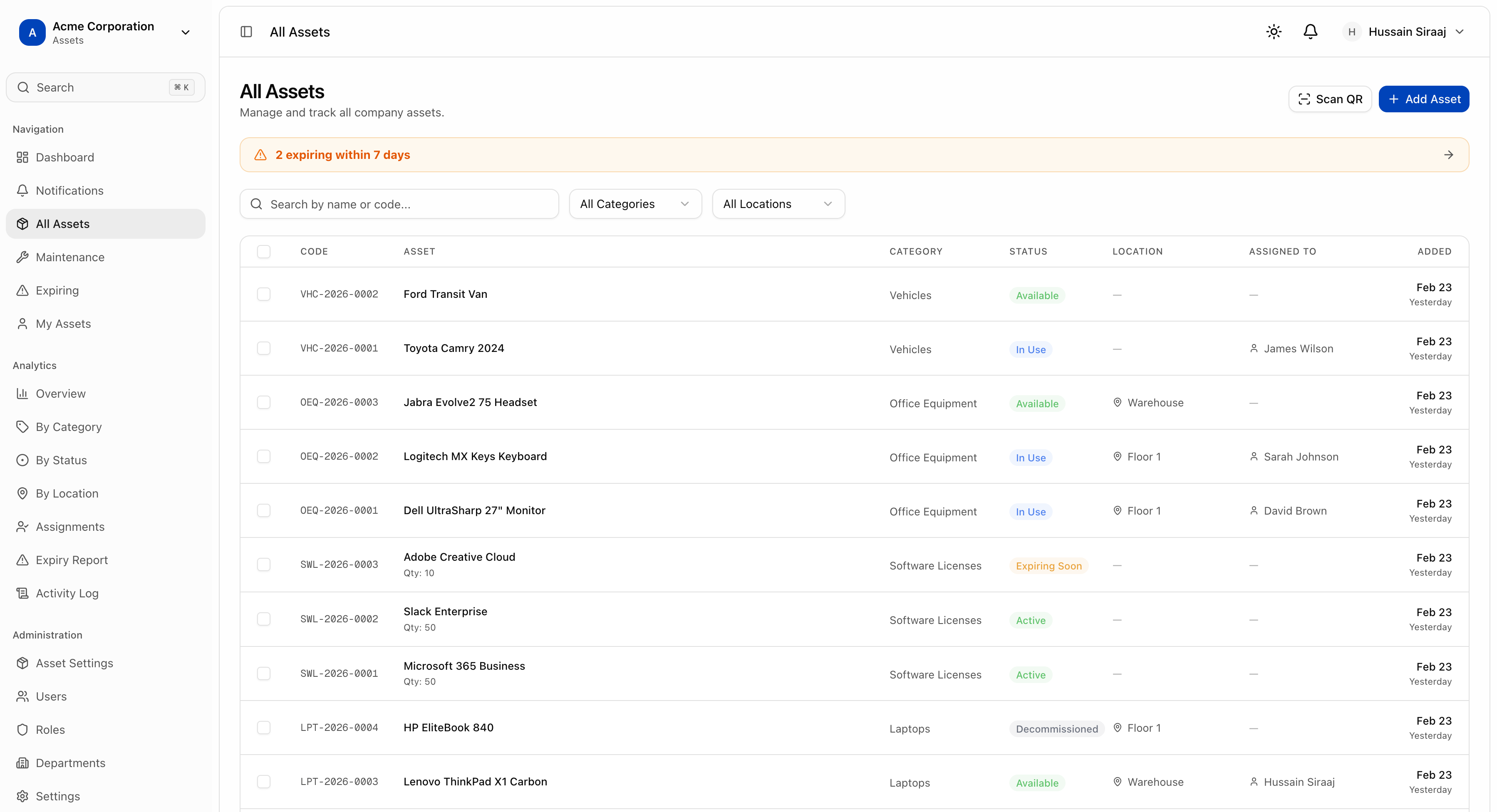
Full lifecycle asset tracking with QR codes, assignment history, maintenance scheduling, and depreciation tracking. Know where every asset is and who has it.
Features
Complete asset control
Everything you need to manage physical and digital assets across your organization.
QR Code Tracking
Generate and print QR codes for every asset. Scan with any device to instantly view details, history, and assignment info.
Full Lifecycle Management
Track assets from procurement to disposal. Manage status transitions: available, in use, under maintenance, retired, or disposed.
Location Tracking
Assign assets to specific locations and buildings. Track where every asset sits across your entire organization.
Assignment & Checkout
Assign assets to users or departments with full history tracking. Know who has what, and when it was assigned.
Maintenance Scheduling
Schedule recurring maintenance, track service history, and get notified when maintenance is due or overdue.
Depreciation Tracking
Configure depreciation methods per asset type. Track current value, useful life, and replacement cost over time.
Custom Asset Types
Create unlimited asset categories with custom fields. Define exactly the metadata you need for each type of asset.
Warranty & Expiry
Track warranty dates and service agreements. Get automatic alerts before warranties expire so you never miss a renewal.
Complete Audit Trail
Every assignment, status change, and maintenance event is logged. Full activity history for compliance and accountability.
IT Asset Management
Purpose-built for tracking computers, monitors, phones, and IT equipment with serial numbers and specs.
Permission Controls
Fine-grained access control: view all, view own, create, manage, and admin permissions for complete security.
Export & Reports
Export asset inventories to CSV. Generate reports by type, location, status, or assigned user for audits.
How It Works
Asset management in four steps
Register Assets
Add assets with serial numbers, purchase info, warranty details, and custom fields. Bulk import from CSV or add individually.
Organize & Categorize
Create asset types with custom fields. Group assets by category, location, department, or any criteria you need.
Assign & Track
Assign assets to users with checkout/checkin workflows. QR code scanning for quick field operations.
Maintain & Report
Schedule maintenance, track depreciation, and generate reports. Get alerts for expiring warranties and overdue services.
Use Cases
Track any asset type
IT Equipment
Laptops, monitors, phones, and peripherals. Track serial numbers, specs, and software licenses per device.
Office Furniture
Desks, chairs, and fixtures. Track location assignments and condition across multiple floors and buildings.
Vehicles
Company fleet management with mileage tracking, service schedules, insurance, and driver assignments.
Lab Equipment
Scientific instruments with calibration schedules, certification tracking, and specialized maintenance logs.
Take control of your assets
Start tracking your assets today. Free 14-day trial, no credit card required.